WinForms: How to hide checkbox of the certain TreeNode in TreeView control
Recently I needed to hide the checkboxes of some nodes in a TreeView-control, i.e. some nodes should be checkable, but the rest shouldn’t.
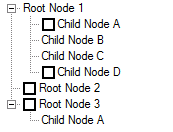
The standard TreeView doesn’t allow doing that directly, but Windows API will help us out. The main idea is to catch the moment when a node has been added to the TreeView, then to examine whether the node’s checkbox must be hidden and, if yes, to send a certain TVM_SETITEM message to the TreeView to hide the checkbox.
Unfortunately, the TreeView doesn’t provide us with an event to be fired right after a node has been added. So, we don’t have any choice, but to deal with WinAPI messages directly inside WndProc.
Having used .Net Reflector I’ve found out that while a node is being added to the Nodes-collection of either the TreeView or another node the following code is running (this piece of code is borrowed from the internal Realize method of the TreeNode class):
this.handle = UnsafeNativeMethods.SendMessage(
      new HandleRef(this.TreeView, this.TreeView.Handle),
      NativeMethods.TVM_INSERTITEM, 0, ref lParam); // the first statement
treeView.nodeTable[this.handle] = this; // the second statement
this.UpdateNode(4); // the third statement
As we can see, after the first statement has been executed the TreeView receives a TVM_INSERTITEM message. In the WndProc of the TreeView, we could catch this message and fetch out the newly added node’s handle from it. The next step would be a getting a TreeNode-object corresponding to the handle as we need the latter to examine whether its checkbox must be hidden. However, at that stage the handle and the TreeNode wrapping it couldn’t yet be matched. The correct matching is available only after the pair <node’s handle, TreeNode-object> has been added to the TreeView‘s hashtable named nodeTable, in other words, after the second statement has completed. Evidently, the TVM_INSERTITEM message would be already processed by that moment. That means the TVM_INSERTITEM can’t be used, and we have to catch and handle another WinAPI message.
Luckily, right after the node has been added and the mapping between the handle and the TreeNode-object has been set up, the UpdateNode method (the third statement) emits a TVM_SETITEM message to the TreeView. So, I decided to handle this type of messages to hide unwanted checkboxes.
Below are two classes, HiddenCheckBoxTreeNode and MixedCheckBoxesTreeView, derived from the built-in TreeNode and TreeView classes respectively. The HiddenCheckBoxTreeNode class indicates a node with checkbox to be hidden. The MixedCheckBoxesTreeView class, in turn, hides unwanted checkboxes.
/// <summary>
/// Represents a node with hidden checkbox
/// </summary>
public class HiddenCheckBoxTreeNode : TreeNode
{
    public HiddenCheckBoxTreeNode() { }
    public HiddenCheckBoxTreeNode(string text) : base(text) { }
    public HiddenCheckBoxTreeNode(string text, TreeNode[] children) : base(text, children) { }
    public HiddenCheckBoxTreeNode(string text, int imageIndex, int selectedImageIndex) : base(text, imageIndex, selectedImageIndex) { }
    public HiddenCheckBoxTreeNode(string text, int imageIndex, int selectedImageIndex, TreeNode[] children) : base(text, imageIndex, selectedImageIndex, children) { }
    protected HiddenCheckBoxTreeNode(SerializationInfo serializationInfo, StreamingContext context) : base(serializationInfo, context) { }
}

public class MixedCheckBoxesTreeView : TreeView
{
    /// <summary>
    /// Specifies the attributes of a node
    /// </summary>
    [StructLayout(LayoutKind.Sequential, CharSet = CharSet.Auto)]
    public struct TV_ITEM
    {
        public int    Mask;
        public IntPtr ItemHandle;
        public int    State;
        public int    StateMask;
        public IntPtr TextPtr;
        public int    TextMax;
        public int    Image;
        public int    SelectedImage;
        public int    Children;
        public IntPtr LParam;
    }

    public const int TVIF_STATE          = 0x8;
    public const int TVIS_STATEIMAGEMASK = 0xF000;

    public const int TVM_SETITEMA = 0x110d;
    public const int TVM_SETITEM  = 0x110d;
    public const int TVM_SETITEMW = 0x113f;

    public const int TVM_GETITEM  = 0x110C;

    [DllImport("user32.dll", CharSet = CharSet.Auto)]
    public static extern IntPtr SendMessage(HandleRef hWnd, int msg, int wParam, ref TV_ITEM lParam);

    protected override void WndProc(ref Message m)
    {
        base.WndProc(ref m);

        // trap TVM_SETITEM message
        if (m.Msg == TVM_SETITEM || m.Msg == TVM_SETITEMA || m.Msg == TVM_SETITEMW)
            // check if CheckBoxes are turned on
            if (CheckBoxes)
            {
                // get information about the node
                TV_ITEM tv_item = (TV_ITEM)m.GetLParam(typeof(TV_ITEM));
                HideCheckBox(tv_item);
            }
    }

    protected void HideCheckBox(TV_ITEM tv_item)
    {
        if (tv_item.ItemHandle != IntPtr.Zero)
        {
            // get TreeNode-object, that corresponds to TV_ITEM-object
            TreeNode currentTN = TreeNode.FromHandle(this, tv_item.ItemHandle);

            HiddenCheckBoxTreeNode hiddenCheckBoxTreeNode = currentTN as HiddenCheckBoxTreeNode;
            // check if it's HiddenCheckBoxTreeNode and
            // if its checkbox already has been hidden

            if(hiddenCheckBoxTreeNode != null)
            {
                HandleRef treeHandleRef = new HandleRef(this, Handle);

                // check if checkbox already has been hidden
                TV_ITEM currentTvItem    = new TV_ITEM();
                currentTvItem.ItemHandle = tv_item.ItemHandle;
                currentTvItem.StateMask  = TVIS_STATEIMAGEMASK;
                currentTvItem.State      = 0;

                IntPtr res = SendMessage(treeHandleRef, TVM_GETITEM, 0, ref currentTvItem);
                bool needToHide = res.ToInt32() > 0 && currentTvItem.State != 0;

                if (needToHide)
                {
                    // specify attributes to update
                    TV_ITEM updatedTvItem    = new TV_ITEM();
                    updatedTvItem.ItemHandle = tv_item.ItemHandle;
                    updatedTvItem.Mask       = TVIF_STATE;
                    updatedTvItem.StateMask  = TVIS_STATEIMAGEMASK;
                    updatedTvItem.State      = 0;

                    // send TVM_SETITEM message
                    SendMessage(treeHandleRef, TVM_SETITEM, 0, ref updatedTvItem);
                }
            }
        }
    }

    protected override void OnBeforeCheck(TreeViewCancelEventArgs e)
    {
        base.OnBeforeCheck(e);

        // prevent checking/unchecking of HiddenCheckBoxTreeNode,
        // otherwise, we will have to repeat checkbox hiding
        if (e.Node is HiddenCheckBoxTreeNode)
            e.Cancel = true;
    }
}
Note the OnBeforeCheck method is intended to prohibit a TreeNode‘s Checked property changing, otherwise we would have to hide an appropriate checkbox again.
Below is a sample of using. Put a MixedCheckBoxesTreeView control upon a form and set a Load handler to the method listed below.
private void Form1_Load(object sender, EventArgs e)
{
    mixedCheckBoxesTreeView1.CheckBoxes = true;
    mixedCheckBoxesTreeView1.Nodes.Clear();

    HiddenCheckBoxTreeNode tn = new HiddenCheckBoxTreeNode("Root Node 1");
    mixedCheckBoxesTreeView1.Nodes.Add(tn);

    TreeNode tn2 = new TreeNode("Child Node Z");
    tn.Nodes.Add(tn2);

    HiddenCheckBoxTreeNode tn3 = new HiddenCheckBoxTreeNode("Child Node A");
    tn3.Checked = true; // just to test that nothing happens here
    tn.Nodes.Add(tn3);

    HiddenCheckBoxTreeNode tn4 = new HiddenCheckBoxTreeNode("Child Node X");
    tn.Nodes.Add(tn4);

    TreeNode tn5 = new TreeNode("Child Node D");
    tn.Nodes.Add(tn5);

    TreeNode tn6 = new TreeNode("Root Node 2");
    mixedCheckBoxesTreeView1.Nodes.Add(tn6);

    TreeNode tn7 = new TreeNode("Root Node 3");
    mixedCheckBoxesTreeView1.Nodes.Add(tn7);

    HiddenCheckBoxTreeNode tn8 = new HiddenCheckBoxTreeNode("Child Node A");
    tn7.Nodes.Add(tn8);

    mixedCheckBoxesTreeView1.ExpandAll();
}
To play with the approach implementation, download a Visual Studio 2010 solution from here.
There is an stack overflow at that implementation, if you start touching the tree when loading nodes in the background and dispatching the add operations to the GUI node.
Sorry about the necro post.
This is fabulous code, though I found that if I changed the value of a node in the tree, the WndProc function causes a stackoverflow. I wound up adding a really simple Suspend property which fixed the issue for me.
public bool Suspend { get; set; } = false;
protected override void WndProc(ref Message m) {
base.WndProc(ref m);
if (Suspend)
return;
….
Hi Stan,
Could you explain how you deal with the WndProc stackoverflow problem?
recently, I also encountered the same overflow problem whenever I want to call method Treeview.ExpandAll() or other methods.
I tried to add a property of Suspend like you said. But it still doesn’t solve problem.
May I ask you how exactly you fix the problem?
Hi Stan,
Could you explain how you deal with the WndProc stackoverflow problem?
recently, I also encountered the same overflow problem whenever I want to call method Treeview.ExpandAll() or other methods.
I tried to add a property of Suspend like you said. But it still doesn’t solve problem.
May I ask you how exactly you fix the problem?